Voice Dispatch
Voice Dispatch speaks each dispatch out loud on your agency's VoiceRelay devices: which units, the alarm, the incident type, the address, cross streets and channels, in the order you choose. The devices themselves are set up under Connect.
Where: Radio & CommsVoice Dispatch
 1234
The tabs 1
| Tab | What it sets |
|---|---|
| Voice | The language, voice, quality and speed, and how numbers are read. |
| Words | Unit prefixes ("E" is said "Engine"), patterns, and how to pronounce local names. |
| Builder | The parts of the announcement and their order. |
| Incident types | What is said for each incident type. |
| Units | How each unit is spoken. |
| Comm plans | How channels are announced. |
| Test & send | Hear a sample, or send a test to your devices. |
Voice
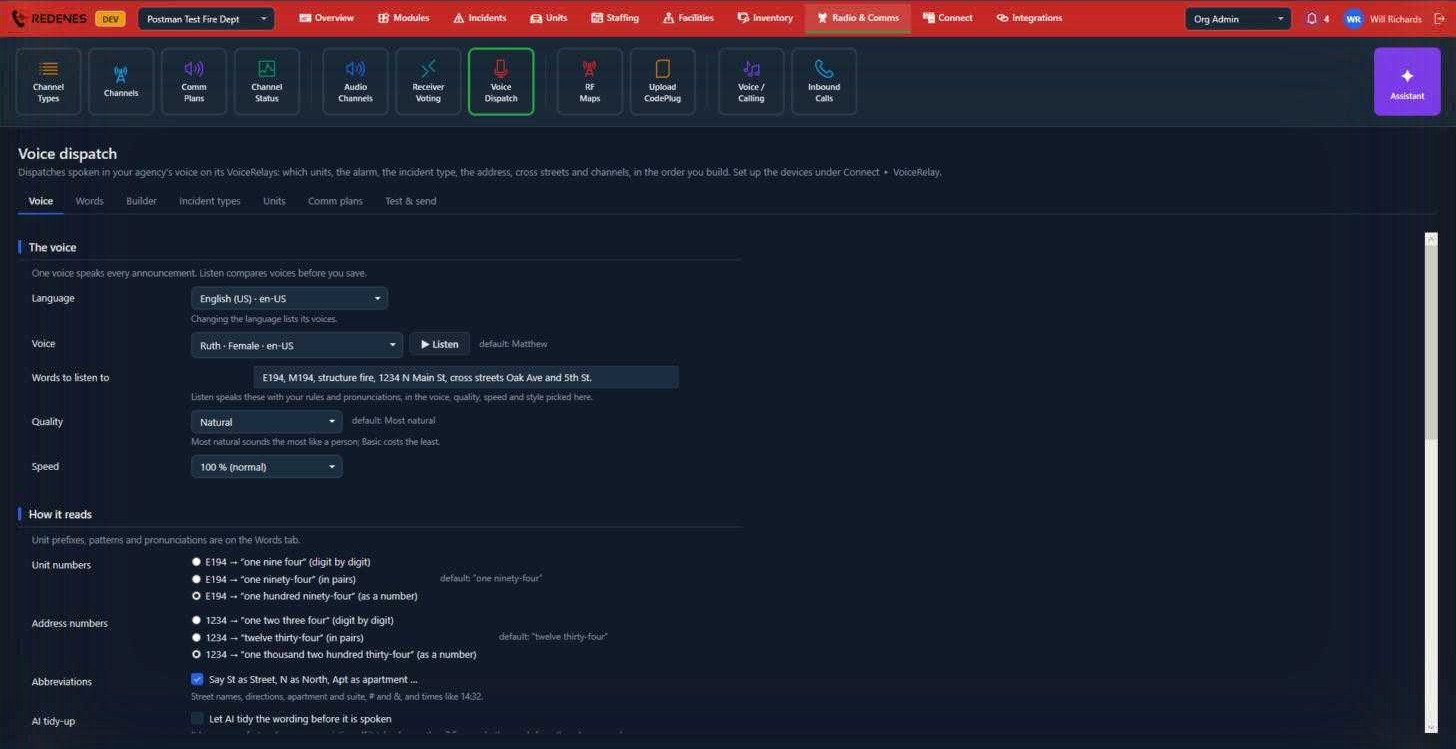
- Pick a Language and a Voice, then click Listen 2 to hear the sample sentence in Words to listen to. Listen uses your rules and pronunciations, so it is the quickest way to check a change before you save.
- Quality and Speed 3: Natural sounds most like a person. Basic costs the least.
- How it reads 4: choose how unit numbers and address numbers are spoken. E194 can be "one nine four", "one ninety-four" or "one hundred ninety-four".
- Abbreviations: says St as Street, N as North, Apt as apartment, and so on.
- AI tidy-up: lets AI smooth the wording before it is spoken.
Each setting shows its default beside it.
Street and place names that the voice gets wrong are fixed on the Words tab. Add the word and type how it should sound.
Words
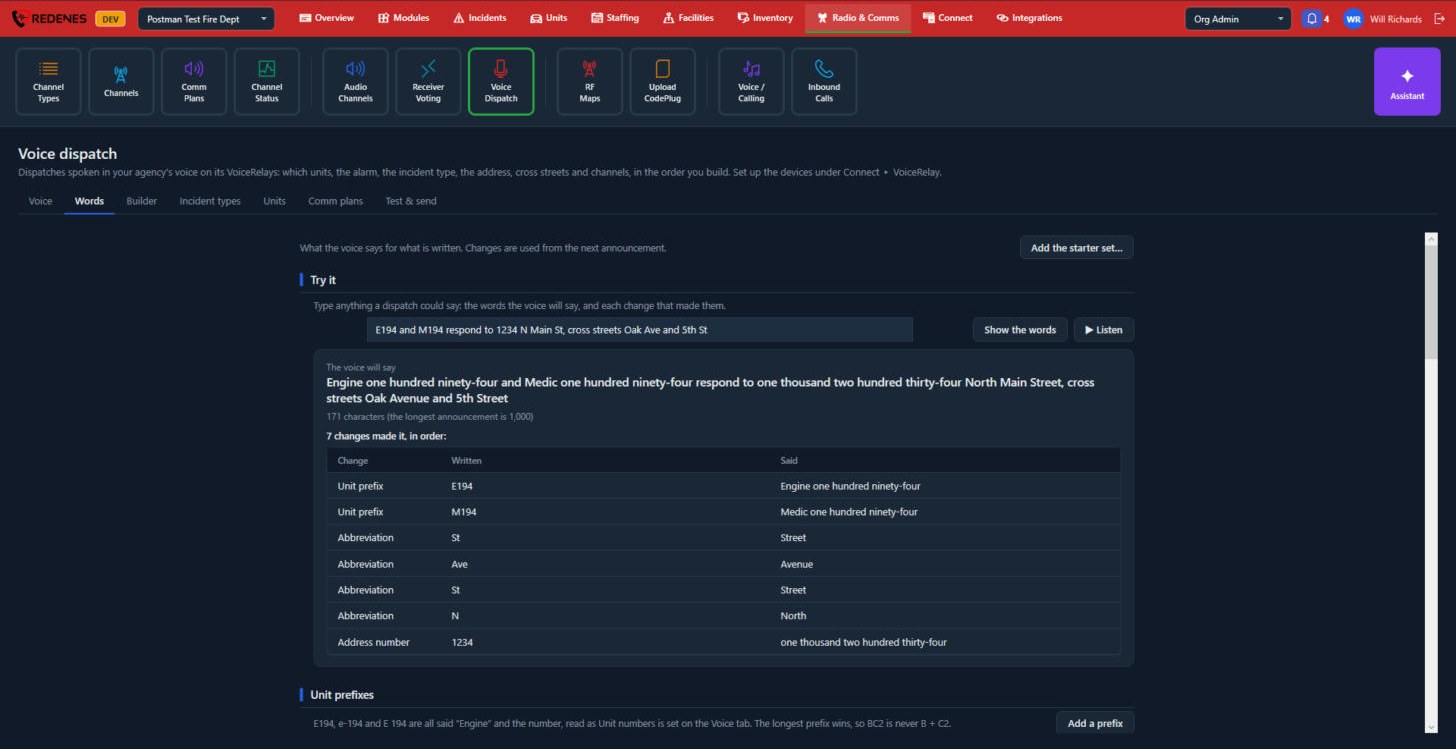
The Words tab sets what the voice says for what is written. Changes are used from the next announcement.
 1234
- Try it 1: type anything a dispatch could say and click Show the words, or Listen to hear it.
- The result 2 shows what the voice will say, and each change that made it: unit prefixes, abbreviations and numbers.
- Unit prefixes 3: E194, e-194 and E 194 are all said "Engine" and the number. Add a prefix adds one. Scroll down for the other word lists, such as patterns and pronunciations.
- Add the starter set 4 adds the common prefixes and abbreviations for you.
Builder
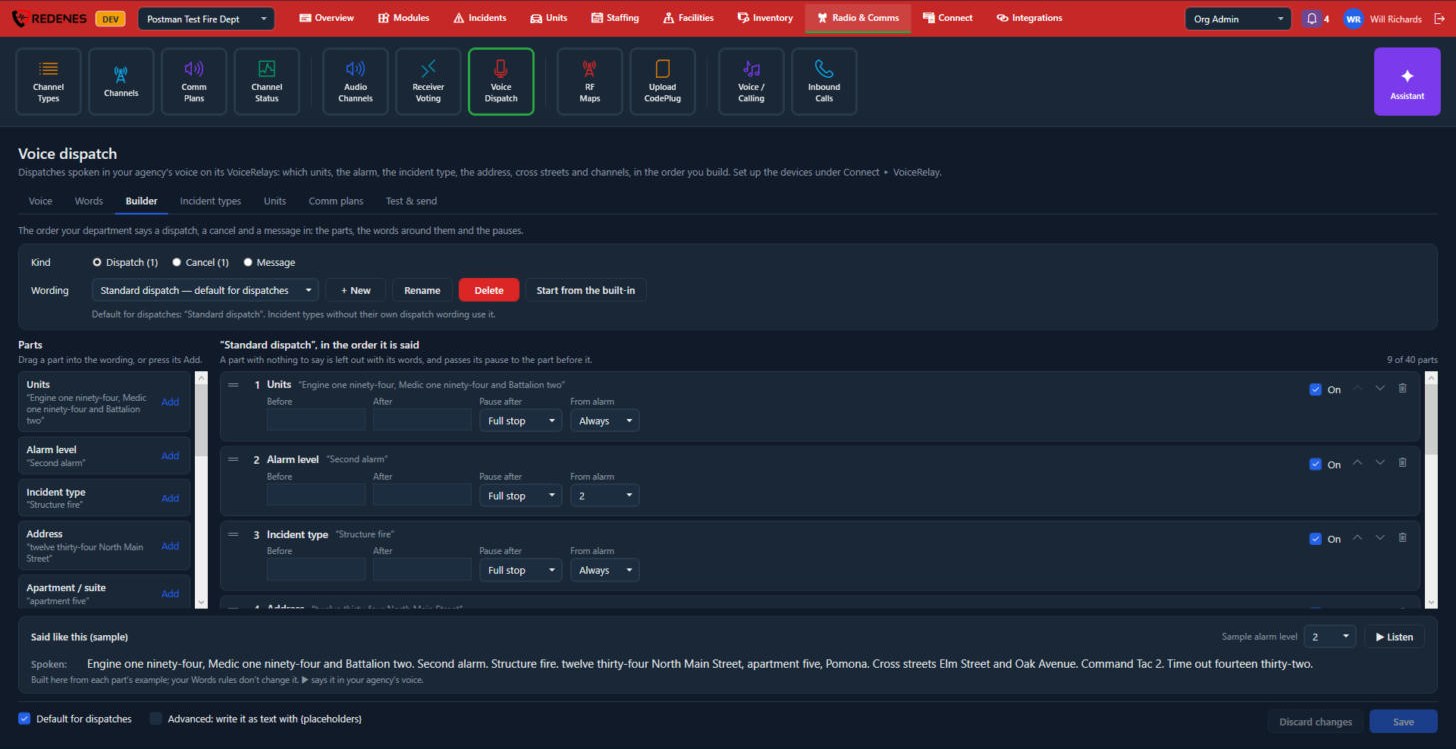
The Builder sets the order your department says a dispatch, a cancel and a message in.
 12345
- Kind and Wording 1: pick Dispatch, Cancel or Message, then the wording to edit. + New makes another wording, Rename and Delete change it, and Start from the built-in puts the standard order back.
- Parts 2: units, alarm level, incident type, address, apartment, city, cross streets, channel, time and more. Drag a part into the wording, or click Add.
- The wording 3, in the order it is said. On each part: words said Before and After it, the Pause after, and From alarm, which says the part only from that alarm level up. Untick On to skip a part. The arrows move it and the bin removes it. A part with nothing to say is left out with its words.
- Said like this 4 shows a sample, and Listen plays it in your agency's voice.
- Default for dispatches 5 makes this the wording that incident types use unless they have their own. Advanced lets you write the wording as text with placeholders.
Click Save at the bottom right when you are done.
Incident types
 123
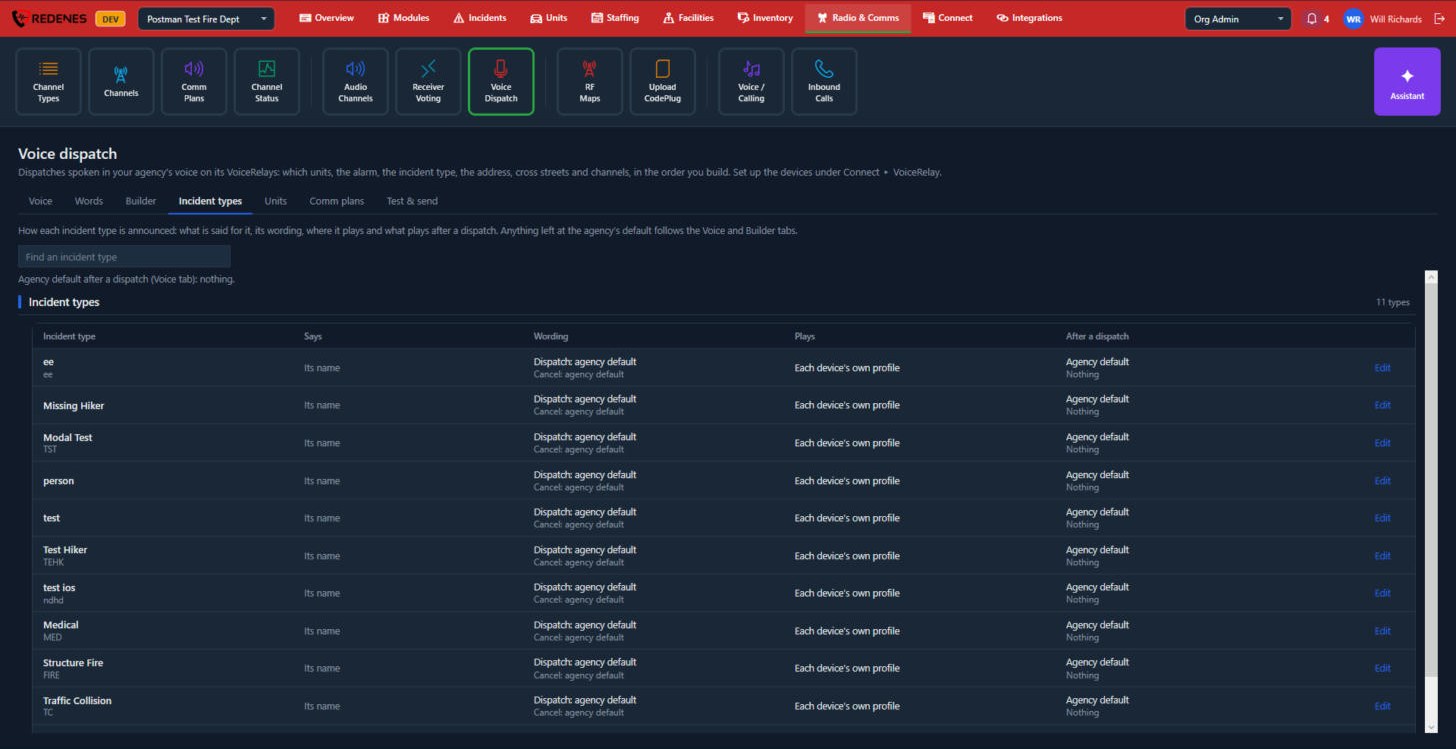
Find a type 1 in the list 2, which shows what is said for it, its wording, where it plays and what plays after a dispatch. Click Edit 3 to change one. Anything left at the agency's default follows the Voice and Builder tabs.
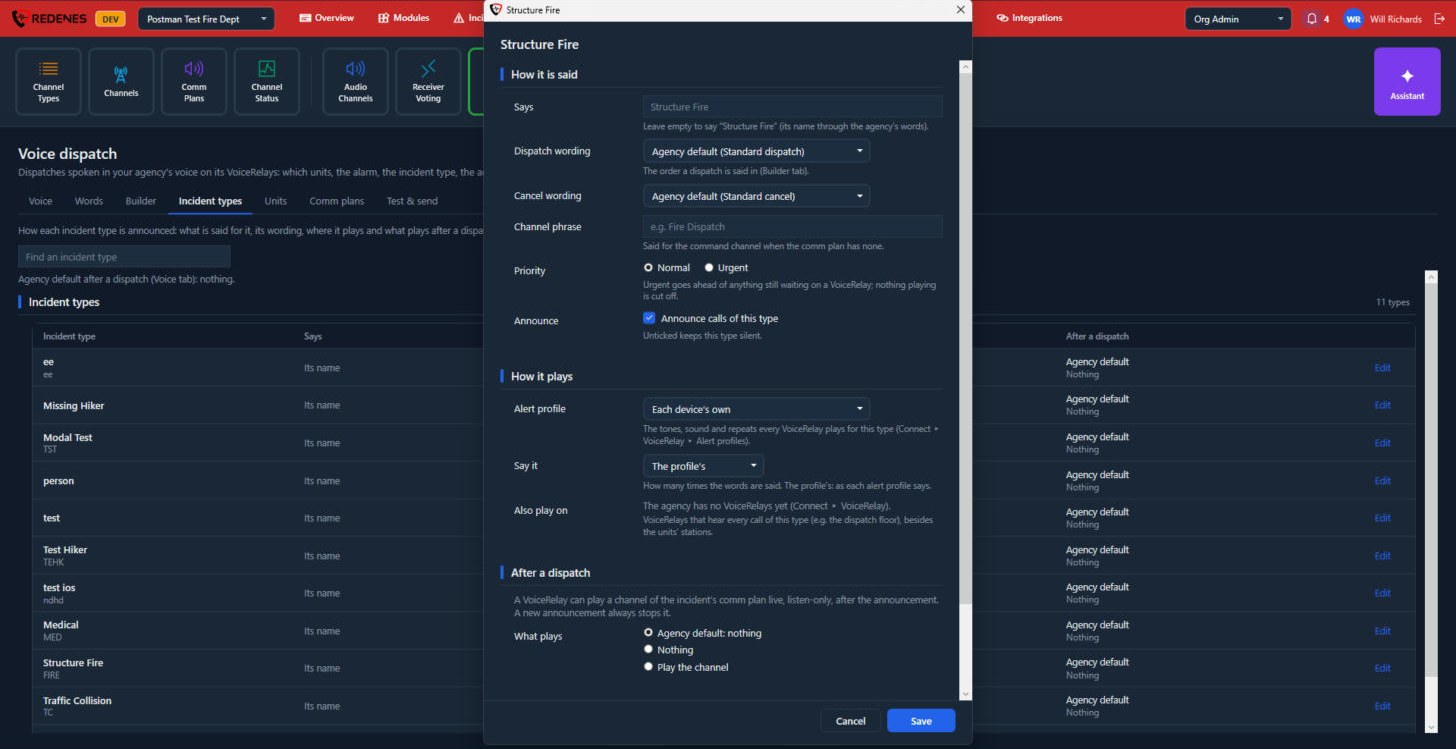 1234
- How it is said 1:
- Says: leave empty to say the type's name.
- Dispatch wording and Cancel wording: the agency default, or another wording from the Builder.
- Channel phrase: said for the command channel when the comm plan has none.
- Priority: Urgent goes ahead of anything still waiting on a VoiceRelay. Nothing that is playing is cut off.
- Announce calls of this type: untick to keep the type silent.
- How it plays 2: the Alert profile (tones, sound and repeats), how many times the words are said, and VoiceRelays that hear every call of this type besides the units' stations, such as the dispatch floor.
- After a dispatch 3: a VoiceRelay can play a channel of the incident's comm plan live, listen-only, after the announcement. Choose the agency default, nothing, or play the channel.
- Save 4.
Units
The Units tab lists your unit types and units. For each you set how it is said, which VoiceRelays hear it dispatched (its stations) and its own alert or pager tones. Units dispatched together are said in their unit types' order, for example engines before medics, unless a unit has its own place.
Comm plans
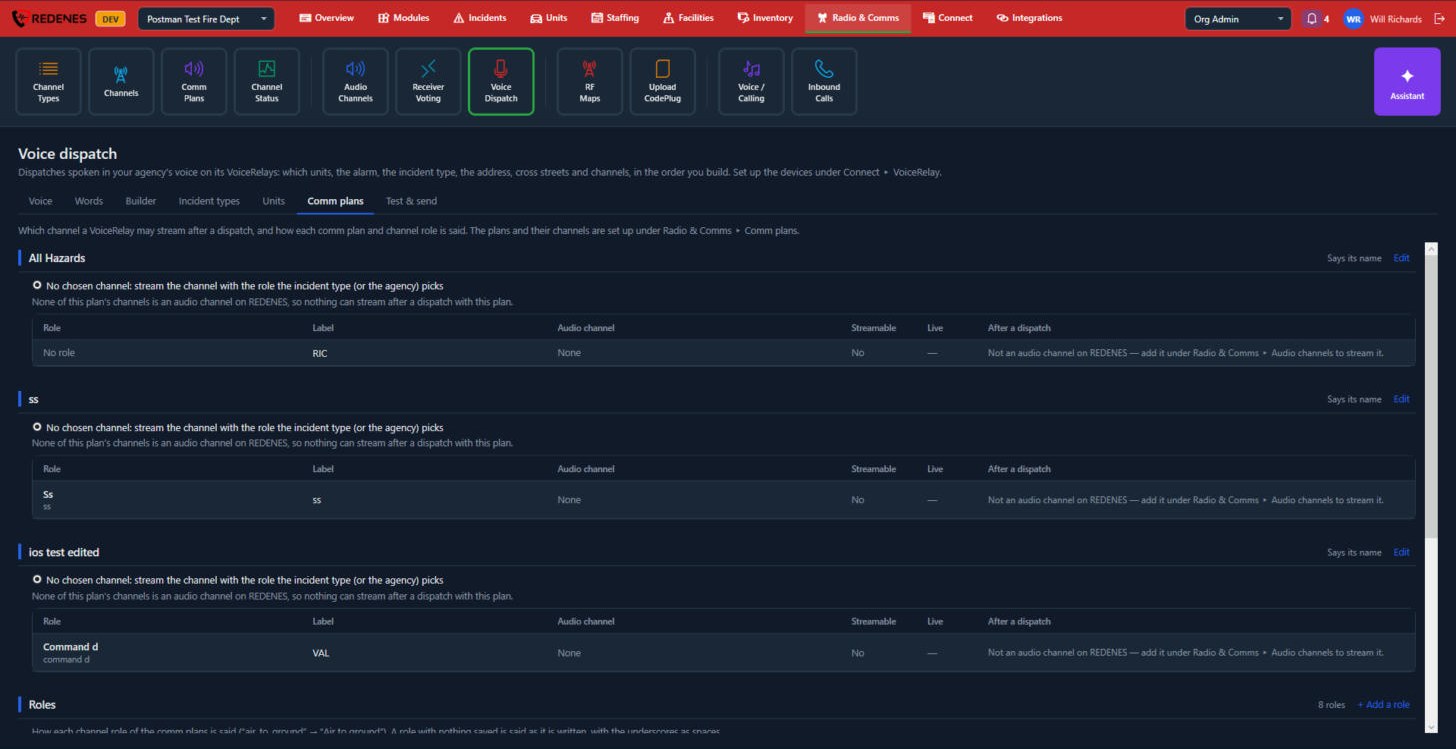 123
- Each comm plan 1 lists its channels, the role of each, the audio channel it is tied to and whether a VoiceRelay can stream it after a dispatch. Only a channel that is also an audio channel on REDENES can be streamed.
- Edit 2 changes how the plan's name is said and which channel is streamed.
- Roles 3: how each channel role is said, for example "air to ground". + Add a role adds one.
Test & send
Test & send has three parts: Compose, Canned messages and Log.
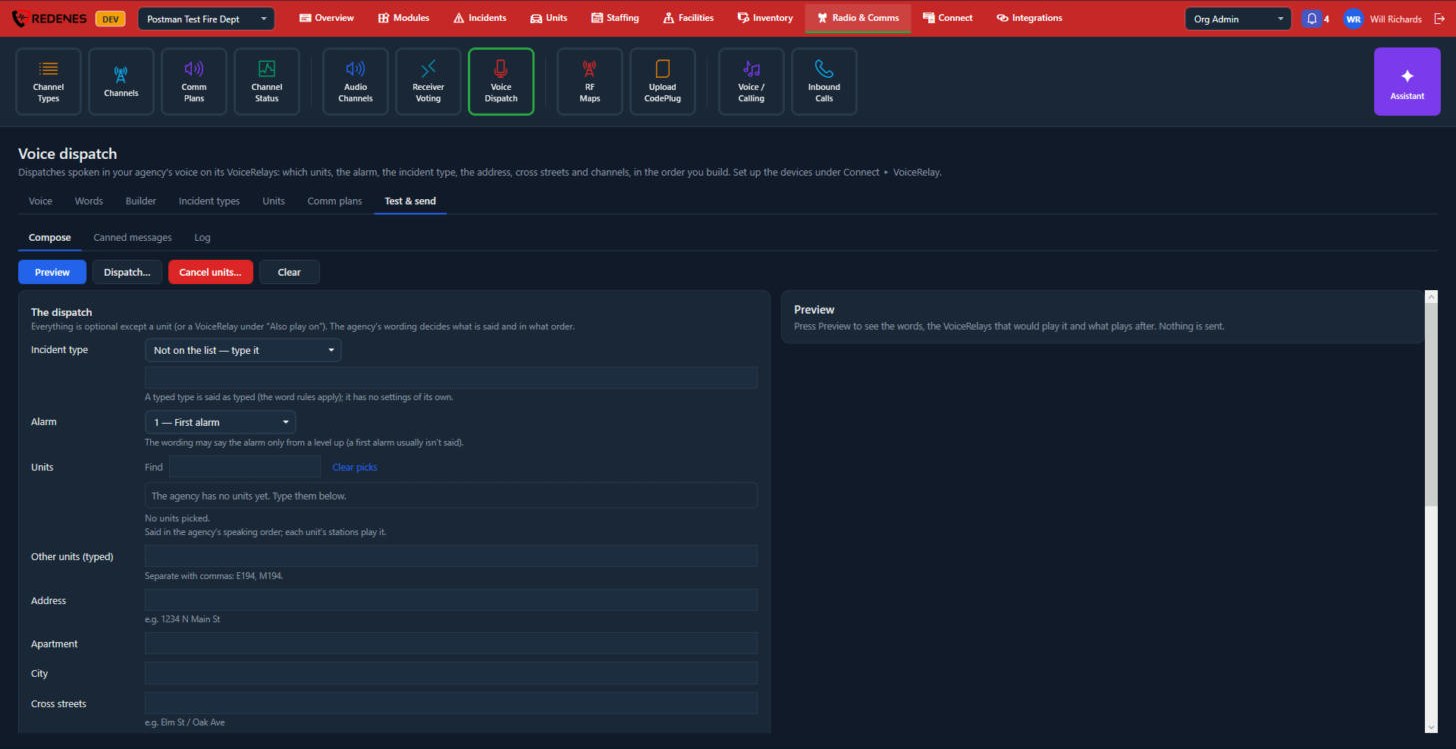 1234
- The three parts 1.
- Preview, Dispatch, Cancel units and Clear 2. Preview sends nothing. Dispatch and Cancel units ask you to confirm, then play on the VoiceRelays.
- The dispatch 3: the incident type, alarm, units, address, apartment, city, cross streets and the rest. Everything is optional except a unit, or a VoiceRelay to play on.
- Preview 4 shows the words, the VoiceRelays that would play them and what plays after.
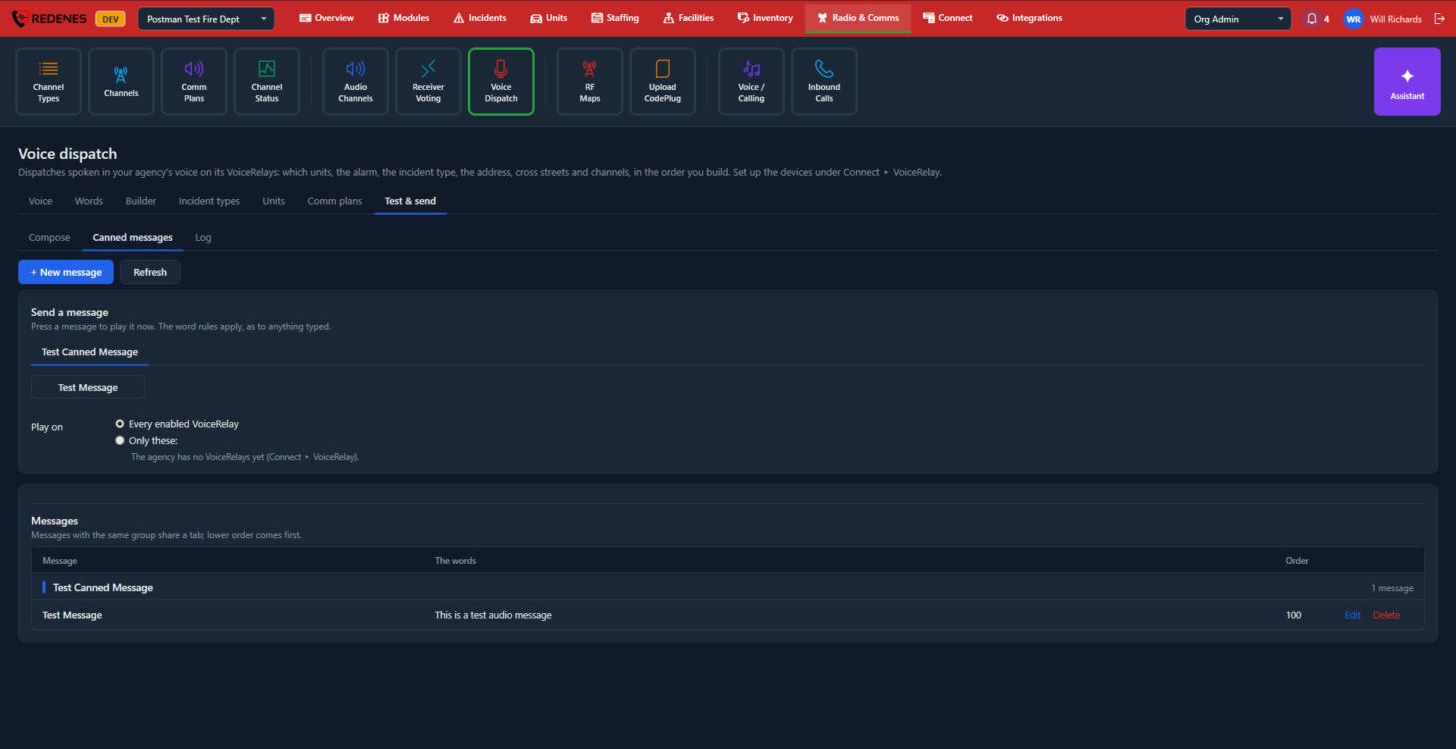 123
- + New message 1 saves a message you send often.
- Send a message 2: click a message to play it now, on every enabled VoiceRelay or only the ones you tick. It plays as soon as you click.
- Messages 3: every saved message with its words and order. Messages in the same group share a tab. Edit and Delete are on each row.
Log lists what was sent, when, the words and the VoiceRelays that played it. Tick Show previews to include previews.